






























Pricing

Products

Blog
Contact Us
Pricing
Products
Blog
Contact Us
Last updated:
October 29, 2026
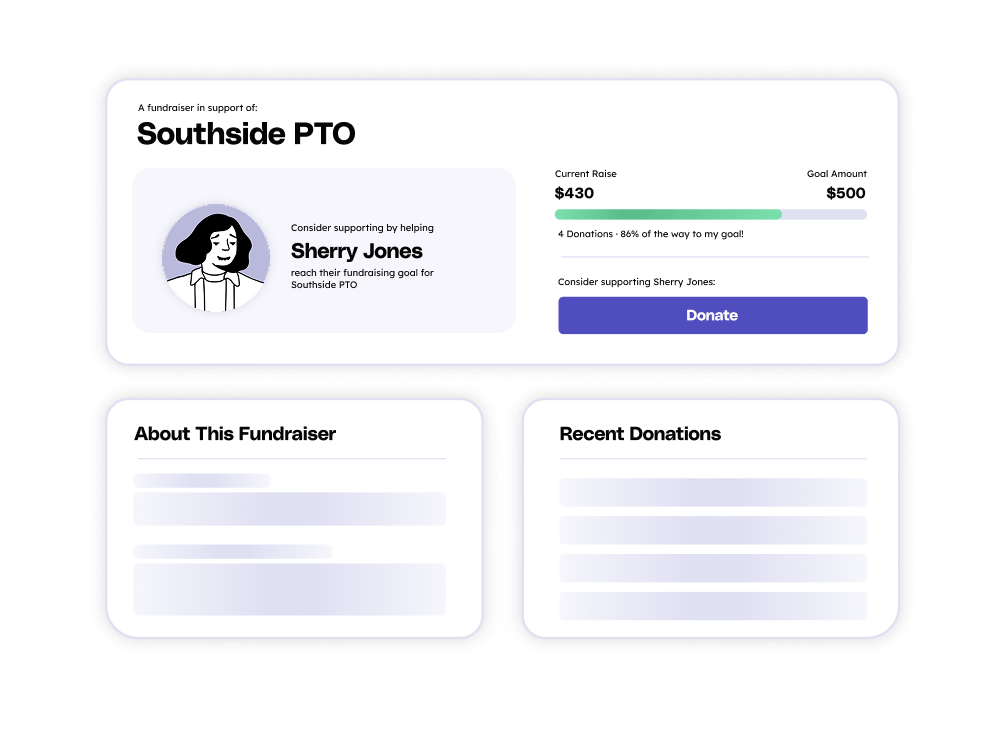
Every Teamfi fundraiser gives each participant their own donation page in addition to the group-wide donation page. Instead of one shared page for the whole organization, every player, student, or member gets a personal page with their own sharing link, so supporters can give directly to the person they know. Donations made through a participant's link are credited to that participant and roll up to the group and organization totals automatically. Every participant donation page includes:
Participant donation pages work alongside the organization's main fundraiser page, which shows combined totals and accepts donations to the group as a whole. Admins see every participant's page activity in the fundraiser dashboard, including each participant's total raised, contacts added, group, and goal progress.
Teamfi includes an individual donation page for every participant on all four fundraising products (Crowdfunding Campaigns, Calendar Fundraisers, A-thon Fundraisers, and Fill My Fundraisers) at no additional cost.
Fundraising Product
Availability
Price
Participant donation pages are created automatically. There is nothing for admins to build or design, and participants have their page the moment they join the fundraiser.
For fundraiser administrators:
For participants:
For donors and supporters:
Every donation made through a participant's page is credited to that participant instantly and counts toward their individual goal, their group's total, and the organization's overall fundraiser total.
Does every participant get their own donation page on Teamfi?
Yes. Every participant on every Teamfi fundraiser type (Crowdfunding, Calendar, A-thon, and Fill My Fundraisers) gets a personal donation page with its own sharing link at no additional cost. The page is created automatically when the participant joins or when their profile is created through CSV Participant Upload, so there is nothing for admins to set up.
How are donations credited when a supporter gives through a participant's page?
Any donation made through a participant's link is credited to that participant and counts toward their individual goal. It also rolls up to the participant's group total (if your fundraiser uses Dynamic Participant Groups) and to the organization's overall fundraiser total. Admins can see who each donation was made to in the dashboard and in CSV exports.
Can supporters still donate to the team as a whole instead of one participant?
Yes. Every fundraiser also has a main organization page that shows combined progress and accepts donations to the group as a whole. Supporters who do not have a specific participant to support, or who want to give to the whole team, can donate there. Those donations count toward the overall fundraiser total but are not credited to any individual participant.
Your team deserves 100%


Teamfi provides free fundraising software for school groups, sports teams, clubs, and nonprofits across the United States.