






























Pricing

Products

Blog
Contact Us
Pricing
Products
Blog
Contact Us
Last updated:
August 26, 2026
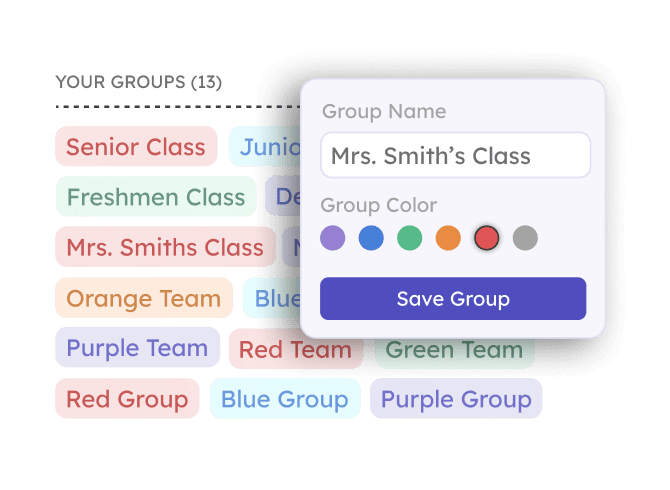
The Dynamic Groups feature allows you to sub-divide your participants for more specific tracking and organization. With groups you can:
The Dynamic Participant Groups feature is available for free on all Teamfi fundraising products: Crowdfunding, Calendar Fundraisers, A-thon Fundraisers, and Fill My Fundraisers.
Fundraising Product
Availability
Price
Using groups on any Teamfi fundraiser is easy and comes built into the product. To make your first group:
You can also edit and delete existing groups at any time throughout your fundraiser. Additionally, if using groups, any exports or reports you download throughout your fundraiser will contain group name.
Is there a limit to how many groups I can create for my fundraiser?
Nope! You can create as many groups as you want – many fundraisers use 30+ groups during their fundraiser to split their participants by team, age group, position, classroom, or anything else you can think of.
Does using the Teamfi dynamic fundraiser groups have an additional cost?
Nope – using dynamic groups on your Teamfi fundraiser is completely free to use for all Teamfi products: Crowdfunding, Calendar Fundraisers, A-thon Fundraisers, and Fill My Fundraisers.
Do we have to use groups in our fundraiser?
No, Teamfi dynamic groups are completely optional for your organization's fundraiser.
Your team deserves 100%


Teamfi provides free fundraising software for school groups, sports teams, clubs, and nonprofits across the United States.