






























Pricing

Products

Blog
Contact Us
Pricing
Products
Blog
Contact Us
Last updated:
September 4, 2026
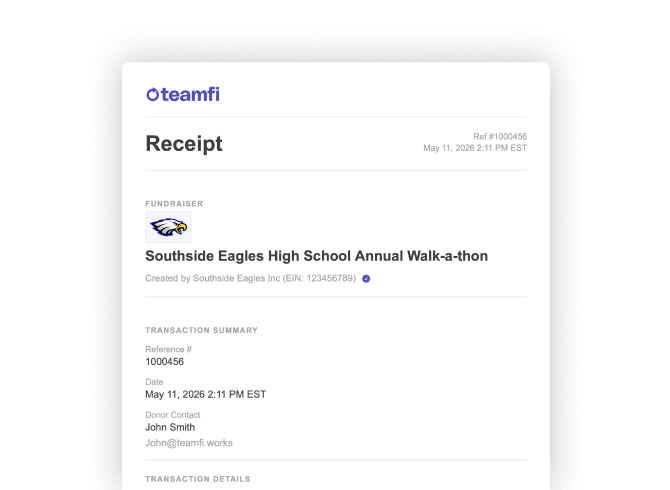
Teamfi makes donation tracking simple with detailed, automated donation receipts. After a donation is completed, donors automatically receive a clear receipt with the information they need to understand and reference their contribution.
With Teamfi Donation Receipts, donors receive:
Detailed Donation Receipts give donors a professional record of every contribution while reducing extra work for organizers. Receipts are sent automatically after each donation, so there is no need to manually create or send payment confirmations.
Teamfi offers detailed, automated donation receipts for every fundraiser type (Crowdfunding, Calendar Fundraisers, A-thon Fundraisers, and Fill My Fundraisers) completely free of charge.
Fundraising Product
Availability
Price
Teamfi automatically sends a detailed donation receipt by email immediately after every completed donation, giving donors a clear record of their contribution without requiring a Teamfi account.
Teamfi Donation Receipts are generated and emailed automatically for every fundraiser, helping donors keep a clear record of their contribution while eliminating the need for organizers to manually create or send receipts. Donors do not need to create or log in to a Teamfi account to receive their receipt, and if a receipt is not delivered, they can contact hello@teamfi.works for assistance.
Does Teamfi automatically send donation receipts?
Yes. Teamfi automatically emails a detailed donation receipt immediately after every completed donation. Receipts are available for every Teamfi fundraiser type, and donors do not need a Teamfi account to receive one.
Do Teamfi receipts include tax information for verified nonprofits?
Yes. If a fundraiser is run by a verified nonprofit, the donation receipt includes the organization’s Tax ID/EIN and relevant tax-related information that donors can keep for their records. Donors should consult a qualified tax advisor to determine whether a contribution is tax deductible.
What should a donor do if they do not receive their receipt?
Donors should first check their spam, junk, or promotions folders for the receipt email. If they still cannot find it, they can contact hello@teamfi.works and the Teamfi support team can help.
Your team deserves 100%


Teamfi provides free fundraising software for school groups, sports teams, clubs, and nonprofits across the United States.