





























Pricing

Products

Blog
Contact Us
Pricing
Products
Blog
Contact Us
Last updated:
September 1, 2026
Pledge donations enable your organization to collect donations per unit on your Teamfi a-thon fundraiser, allowing you to tie your fundraiser to performance of your participants during an event. With your fundraiser dashboard your organization can easily collect, track, and manage pledged donations on your Teamfi fundraiser for free.
While running a custom a-thon fundraiser, you can collect pledges based on any unit imaginable. Common examples are:
With Teamfi, you can create you own custom a-thon and customize your pledge units to ensure your fundraiser collects pledge donations exactly how you want.
Collecting pledge donations is the defining feature of Teamfi digital A-thon fundraisers and is completely free to use.
Fundraising Product
Availability
Price
To create your custom a-thon fundraiser and start collecting pledge donations it is incredibly easy:
Throughout your full a-thon fundraiser, you can track all pledges made via live dashboard and csv export, as well as those that have been paid and those that have not yet been paid.
How do pledge donations work on Teamfi?
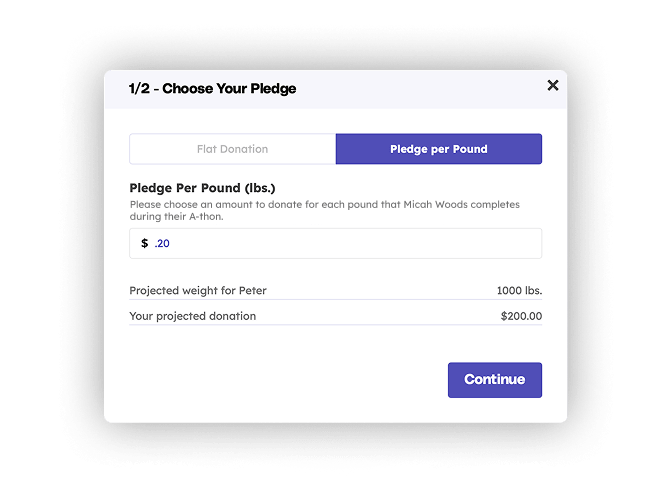
Pledge donations let supporters pledge an amount per unit of performance (per lap walked, shot made, pound lifted or any custom unit you set) instead of a flat amount. Participants set a projected performance when they join, donors make their pledges, and after your event you enter each participant's actual performance on your fundraiser dashboard. Teamfi then automatically follows up with every pledge-maker, showing them how their participant performed and what their pledge totals.
Which Teamfi fundraisers support pledge donations?
Pledge donations are the defining feature of Teamfi's a-thon fundraisers, including walk-a-thons, hit-a-thons, shoot-a-thons, and lift-a-thons. You can also create a custom a-thon with any pledge unit you choose. Collecting pledges on your Teamfi fundraiser is completely free as Teamfi charges 0% platform fees.
Can donors still make regular donations during an a-thon fundraiser?
Yes. Teamfi A-thon fundraisers accept both pledges and flat donations, so supporters who don't want to pledge per unit can give a one-time amount instead. Both types of donations appear on your live dashboard and in CSV exports, and you can see which pledges have been paid and which are still outstanding.
Your team deserves 100%


Teamfi provides free fundraising software for school groups, sports teams, clubs, and nonprofits across the United States.