






























Pricing

Products

Blog
Contact Us
Pricing
Products
Blog
Contact Us
Last updated:
October 29, 2026
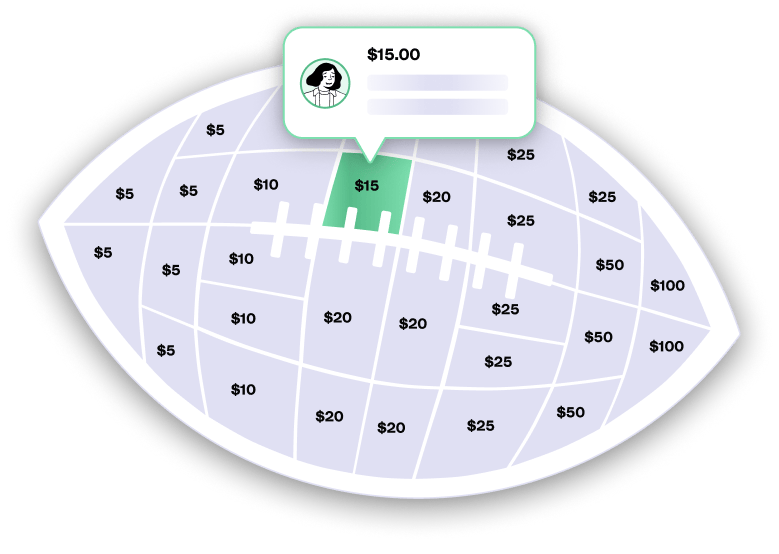
With a Teamfi Fill My Fundraiser, you collect donations from supporters tied to the spaces on a digital shape, such as a football, basketball, hockey stick, singlet, bow, or music note. Each shape has 30 spaces with set donation amounts ranging from $5 to $100, and a fully filled shape raises $740. This is a built-in, core function of Fill My Fundraisers and works automatically on every participant's page when you choose a Fill My fundraiser. Additionally:
Collecting space donations is the defining feature of Teamfi Fill My Fundraisers and is completely free to use.
Fundraising Product
Availability
Price
For supporters to claim a space on one of your fundraiser participants' shapes, all a donor has to do is:
Every claimed space is trackable by the fundraiser admin at the participant level and the fundraiser level through live metrics and the Fill My Data export in CSV reports, which lists spaces filled and spaces remaining for each participant.
How do Fill My space donations work on Teamfi?
Each participant in a Teamfi Fill My Fundraiser gets their own digital shape with 30 spaces, each with a set donation amount from $5 to $100. Supporters open the participant's page, pick one or more available spaces, and pay through Stripe's encrypted checkout. Claimed spaces are filled in on the shape, with the donor's name if they choose to leave it. A shape with every space claimed raises $740.
Which Teamfi fundraisers support Fill My space donations?
Space donations are built into Teamfi Fill My Fundraisers and are included for free on every shape, including Fill My Football, Basketball, Hockey Stick, Singlet, Bow, and Music Note. They aren't part of Crowdfunding Campaigns, Calendar Fundraisers, or A-thon Fundraisers, which each collect donations in their own way.
What happens if a participant doesn't fill every space on their shape?
Nothing breaks. There is no minimum to hit, and every claimed space and custom donation counts toward the participant's total and the fundraiser total. The shape simply shows which spaces are still open, which gives participants a clear target to share toward. Organizers can see spaces filled and spaces remaining for every participant in live metrics and CSV exports.
Your team deserves 100%


Teamfi provides free fundraising software for school groups, sports teams, clubs, and nonprofits across the United States.