




























What Is a Pick a Date Calendar Fundraiser?
A Pick A Date Calendar Fundraiser (sometimes called a pick-a-day calendar fundraiser) is a donation-based fundraiser where supporters pick a date, or multiple dates, on a calendar and donate the amount matching the date. In the pick-a-date format, each date represents a donation amount that corresponds to the date of the day– so sponsoring day 20 means giving $20. Supporters can choose one date or multiple dates, and the goal is for each participant to fill their calendar, with the sum of a 31 day calendar equaling $496.
The Three Types of Calendar Fundraiser
1. Pick a Date Calendar Fundraiser
In this version of a calendar fundraiser, supporters choose dates on a calendar and donate the matching dollar amount. For example, choosing day 25 means making a $25 donation. If a 31 day calendar is filled, the amount raised sums to $496.
These calendars can be run digitally or on pen & paper. Digital calendar fundraisers are easier to share, track, and manage because donations are collected online, but pen & paper versions can feel more personable.
2. Calendar Sales
Calendar sales fundraisers involve selling physical calendars as a product. A team might sell printed calendars with player photos, game schedules, sponsor ads, or community images. Supporters buy the calendar itself rather than sponsoring individual dates, which makes this more like a traditional product fundraiser than a pick-a-date donation calendar.
3. Calendar Raffle Fundraiser
A calendar raffle fundraiser uses the calendar as a prize drawing schedule. Supporters buy raffle entries, then winners are drawn on specific dates, with one prize winner each day for a month.
How a Pick a Date Calendar Fundraiser Works
In a pick-a-date calendar fundraiser, each date represents a donation amount. For example, sponsoring day 28 means giving $28. Supporters can also choose multiple dates, so days 28 and 29 would equal a $57 donation.
Once a supporter sponsors a date, their name is added to that spot. The goal is for each participant to fill every date on their calendar, along with any bonus or “any amount” spaces.
The pick-a-date widget below illustrates this functionality:
Who Can Run a Pick a Date Calendar Fundraiser?
Pick A Date calendar fundraisers can work for nearly any organization with participants, families, members, or volunteers who are willing to ask for support.
Common groups include:
- Youth, club, school, and travel sports teams
- School clubs and classrooms
- Bands, choirs, orchestras, and theatre programs
- Churches and youth ministries
- Dance studios and competition teams
- Cheerleading and gymnastics programs
- Animal shelters and rescue organizations
- Nonprofit organizations
- Community clubs
- Fraternities and sororities
- Scout troops
- Individual participants fundraising for a larger organization
The fundraiser works especially well when each participant receives an individual calendar and has a personal goal. However, smaller organizations can also use one shared calendar and promote it through staff members, volunteers, and supporters.
Paper vs. Digital: Two Ways to Run a Pick a Date Fundraiser
Pick a date to donate calendar fundraisers can be run through two main methods: on pen and paper (everything tracked manually) or digital using a calendar fundraising platform.
This comprehensive how to guide can be used for both versions of the pick a date calendar – learn more about both ways of running a calendar fundriaser here:
The comprehensive, all-inclusive steps below work for both formats and highlight where the two formats differ.
Steps to Run a Pick a Date Calendar Fundraiser
Through Teamfi’s analysis of 2,000+ Pick A Date Calendar Fundraisers run on our platform, the best Pick A Date Calendar Fundraisers follow the following 12 steps:
Step 1: Choose the Fundraiser Timeline
Most calendar fundraisers should run for approximately two to four weeks.
A campaign that is too short may not give participants enough time to contact supporters. A campaign that runs too long can lose momentum and create collection problems.
Two to four weeks has the additional benefit of allowing donors that are paid biweekly to budget for donations out of multiple pay periods.
A simple two to four week timeline could look like this:
- Day 1: Hold a kickoff meeting and distribute calendars to participants.
- Days 2–7: Participants contact family members, friends, coworkers, neighbors, and other supporters.
- Day 8: Send a progress reminder.
- Days 9–14: Participants follow up and promote their remaining dates.
- Day 15: Send a final reminder.
- Days 16–18: Collect calendars and outstanding payments.
- Day 19: Reconcile funds and announce the total.
Avoid ending the fundraiser without a clear return date. Participants should know exactly when calendars and collected money are due.
When possible, schedule the collection date on a practice night, meeting date, school day, rehearsal, or other time when most participants will already be present.
Step 2: Decide Who Will Be Participating in Your Fundraiser & Set Your Overall Fundraising Goal
Start off the process by figuring out how many participants you have on your team. That number will be the first indicator of how much you can raise. Have 10 fundraiser participants? 20? 100? The more fundraiser participants the higher the potential.
Set a goal based on that number that is a comfortable mix between ambitious and reasonable.
Then estimate how many calendars must be completed to reach that goal. For example, imagine that a volleyball program has 25 players.
Because one completed calendar raises $496:
25 * $496 = $12,400
However, this is not a realistic goal for a calendar fundraiser — based on Teamfi's data of 22,449 calendar fundraiser participants from 2025-26, the average calendar fundraiser participant raises $192.61. So, for the same team of 25, an average outcome might be closer to $4,815.25.
Step 3: Decide Whether You’ll Be Incentivizing Your Participants
While not a requirement for successful calendar fundraisers, it is one of the most successful strategies that programs implement to boost fundraising success. This is especially true when elementary and middle school programs are involved.
Examples of calendar fundraiser incentives include:
Top fundraiser prize: Give a gift card, team gear, or special recognition to the participant who raises the most.
Completed calendar reward: Give every participant who fills their full calendar a reward or entry into a raffle.
Participation reward: For every participant who invites 20 people to donate, they get a small prize, just for participating. Note that this can be combined with a digital platform (like Teamfi)that tracks the amount of automated SMS donation reminders sent per participant.
Team goal reward: If the whole group reaches its goal, offer a team-wide prize like a pizza party, team outing, or special event.
Position group or class competition: For sports teams or school groups, let smaller groups compete against each other to create extra motivation.
Incentives are an additional cost, but when they’re tied to increased amounts, they are well worth it. Encanto, Creekside, and Wise Elementary’s PTOs used incentives to their advantage, all raising over $13,000.
Step 4: Choose and Customize Your Calendar
The calendar should be easy for participants and donors to understand.
A good calendar fundraiser should have features that are going to help push your fundraiser to success. These features include, but are not limited to;
- Show whose calendar it is
- Show what group is collecting the funds
- Have custom donation spaces at the end of the calendar for large donations.
- A space for communicating timeline, program goals, incentives, and mission statements.
The good news is that we’ve put together a simple to use pick a date to donate calendar fundraiser template you can download below.
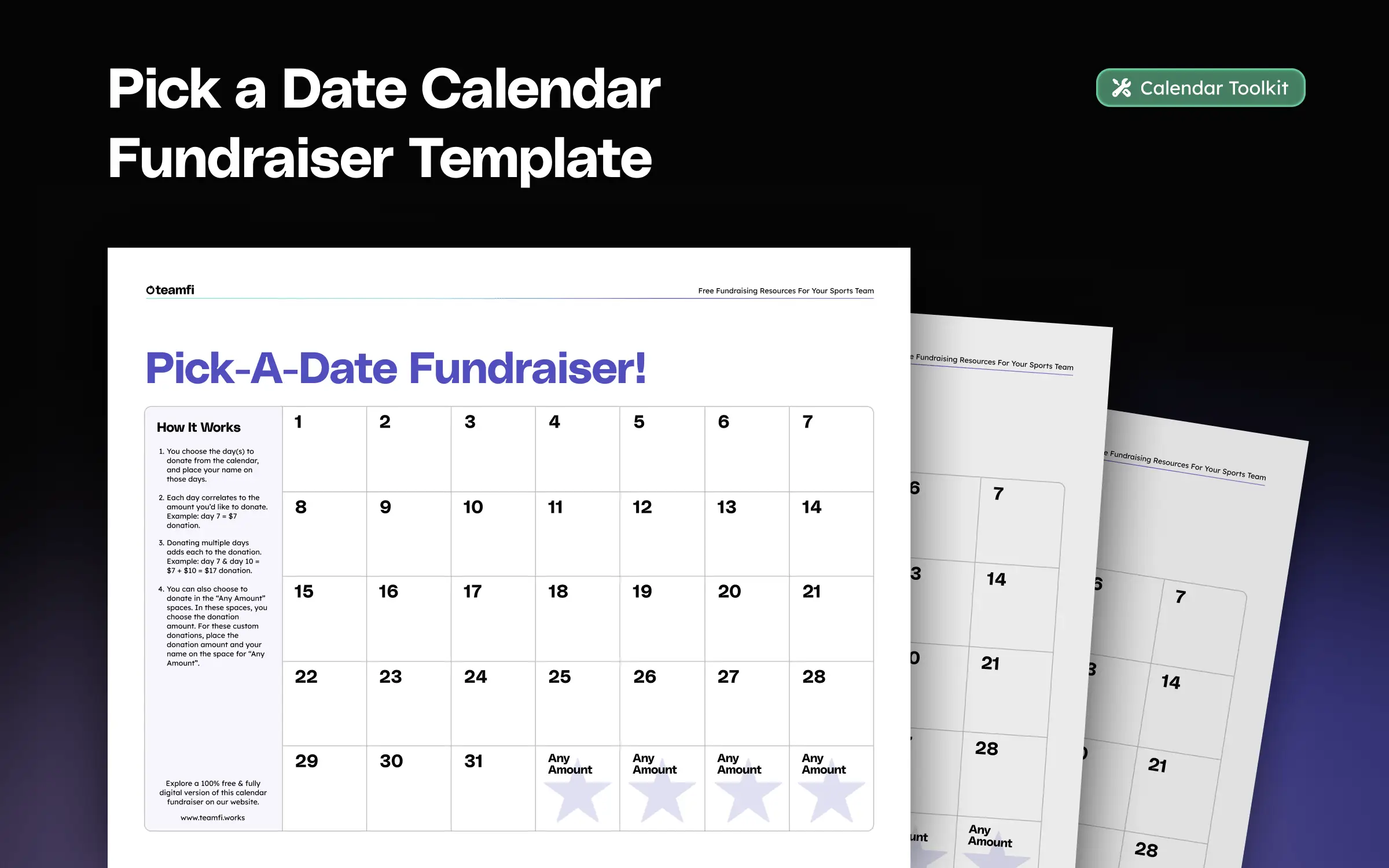
Looking for a sport or theme specific pen and paper calendar template? Check out our full fundraising template library of 30+ templates.
Thinking about going digital? Good news – Teamfi’s digital calendar is already branded with your group's branding and each participant calendar is personalized with their photo and name.
Step 5: Decide How Donations Will Be Collected
Choose a few clear payment options before launch, such as cash, checks, card payments, or an approved payment app.
Possible options include:
- Cash
- Checks
- Online card payments
- Approved person-to-person payment apps
- A combination of methods
The easier it is to donate, the more likely participants are to receive multiple contributions.
Step 6: Create a Donation Tracking System
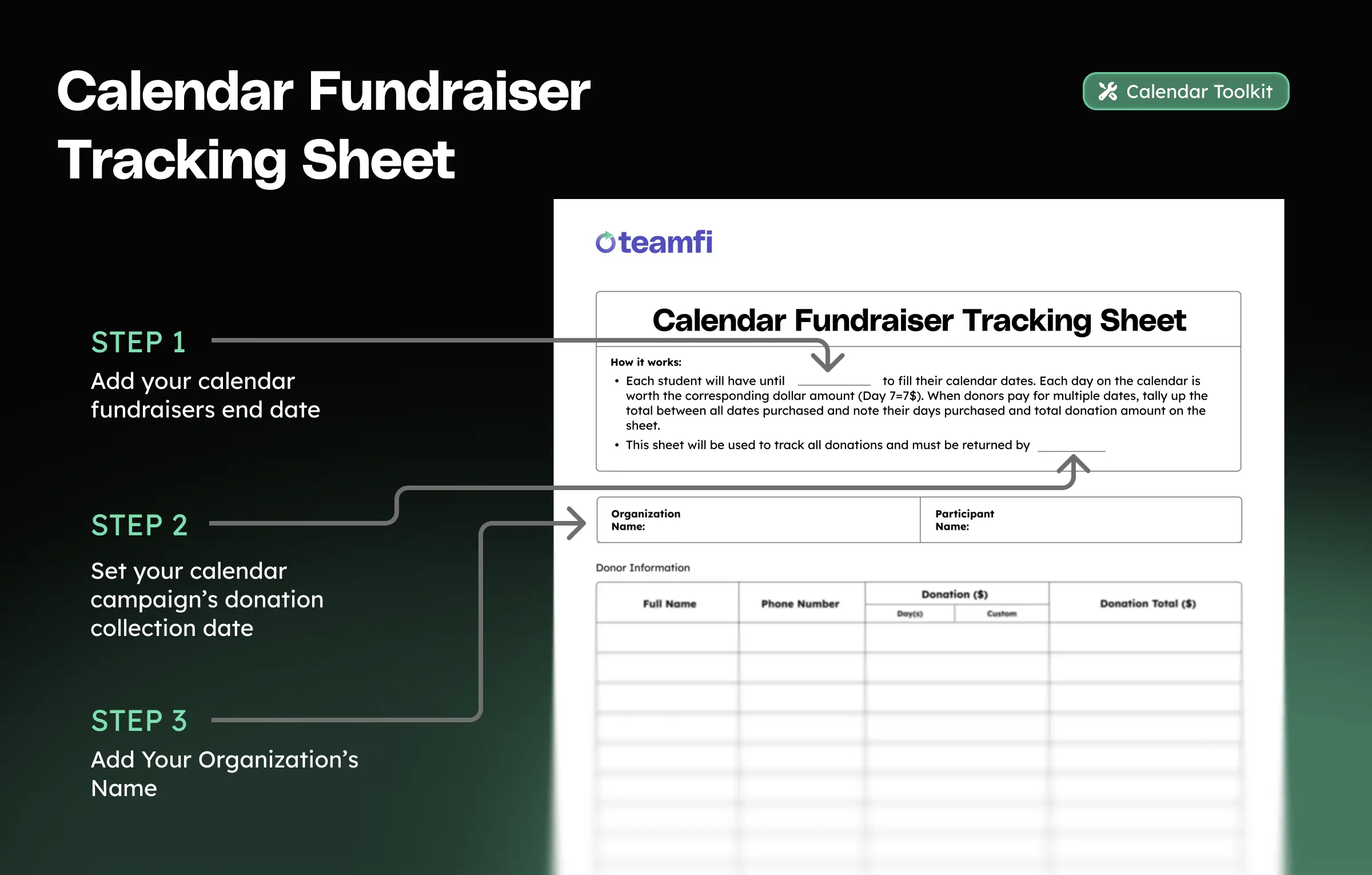
Every calendar fundraiser needs to track three things for each donation: who gave, which dates they claimed, and whether the payment has actually been received. The calendar itself only captures the first two — a filled-in date doesn't tell you if the money came through.
Running digitally? Teamfi's digital calendar fundraiser records all of this automatically as donations come in — you can skim ahead to Step 7.
On paper, participants track everything manually. Each participant should note the donor's name, amount donated, payment method, and whether that payment has been made. We've created a free donation tracking sheet to use in tandem with our paper calendar template. It works best printed on the flip side of the calendar, so the tracker travels with the calendar it belongs to.
Step 7: Hold a Fundraiser Kickoff
A kickoff isn't a formality — it's where campaigns build their early momentum. We find that a third of all donations arrive within the first 24 hours of a campaign's kickoff.
Kickoffs for Paper Pick a Date Calendars
When running a paper calendar fundraiser campaign, you're not going to want to hand out calendars to your fundraiser participants without explaining the fundraiser.
A brief kickoff meeting can eliminate common mistakes and improve participation.
During the kickoff:
- Explain what the fundraiser supports.
- Share the organization’s total goal.
- Communicate Incentives.
- Demonstrate how donors select dates.
- Review accepted payment methods.
- Explain how participants should record donations.
- Give every participant a calendar and tracking sheet.
- Provide sample outreach messages.
- Confirm the final deadline.
- Explain where and when money should be returned.
- Tell participants who to contact with questions.
- If communicating with minors, have a parent handout ready to take home (free example right here).
Show participants a completed example.
For instance, if a donor selects the 8th, write the donor’s name on the 8th and record an $8 contribution. If the donor also chooses the 17th, the total contribution becomes $25.
Participants should record the donation immediately so the same date is not accidentally offered to another supporter.
Kickoffs for Digital Pick a Date Calendars
Opting for a digital calendar? Your kickoff gets shorter — no materials to hand out, no cash instructions to cover — but this doesn't always mean you should skip entirely. Instead, you could use it to have every participant set up their fundraiser page and add their potential supporters on the spot: as you'll see in the next step (Step 8), the number of contacts a participant adds is the single biggest predictor of how much they raise.
Step 8: Participants Ask Supporters to Choose a Date
Participants can promote their calendars in person, by text, through email, or on social media.
The request should explain:
- Who is fundraising
- What the money supports
- How the calendar works
- How to donate
- When the fundraiser ends
Sample Social Media Post
Encourage participants to personalize their messages. A short explanation of why the fundraiser matters to them can make the request more meaningful.
Running your fundraiser digitally with Teamfi? The caption still works for your feed and story — just swap the last line for your fundraiser page link, so donors select and pay for dates directly. And the follow-up side is handled for you: Teamfi automatically sends reminder texts to every contact a participant adds.
Donor Follow Up Matters
While posting on social media is a smart way to spread the word, automated text messaging can take that outreach a step further. Social posts depend on supporters seeing the fundraiser in their feed, but text messages give participants a more direct way to reach the people most likely to donate.
With Teamfi, participants can send fundraiser links through automated text messaging instead of manually writing the same message to every supporter. That makes it easier to contact family, friends, neighbors, and past supporters, while also helping participants follow up throughout the fundraiser.
For teams and clubs, automated texting can help keep participation higher because it removes one of the biggest barriers: getting every participant to consistently share their calendar fundraiser.
Below you can see from Teamfi’s data what may seem to be an assumed likelihood. The more contacts texted, the higher the result.
Step 9: Record Every Donation Immediately
Running digitally? Teamfi records each donation the moment it's made — names, dates, and payment status log themselves in real-time, so you can skim ahead to Step 10.
As soon as a donor selects a date, write the donor’s name on the calendar and add the donation to the tracking sheet.
Do not wait until later. Delayed tracking can lead to lost donations, OR even worse, two donors buying the same day. This can cause frustration in your donor base.
A full calendar is not the same as a fully paid calendar. Organizers should base the final total on payments received, not verbal commitments.
Digital platforms provide no room for mistake, as they only record donations if they are made, and the record is made immediately.
Step 10: Promote the Fundraiser Throughout the Campaign
As mentioned in Step 8, one announcement is rarely enough. We find that 10% of donors take at least 4 reminders to make their donation. Participants may plan to promote their calendars consistently but often stop after the first few days, so organizers should send scheduled reminders and provide fresh messages they can share.
Real data from Teamfi fundraisers:
The number of people contacted has a direct impact on fundraising results. Whether the campaign is paper or digital, participants who reach more potential supporters tend to receive more donations and raise more overall, as the data below shows.
Step 11: Collect Calendars and Donations
Running digitally? There's no collection day — donations arrive online as they're made, so you can skim ahead to Step 12.
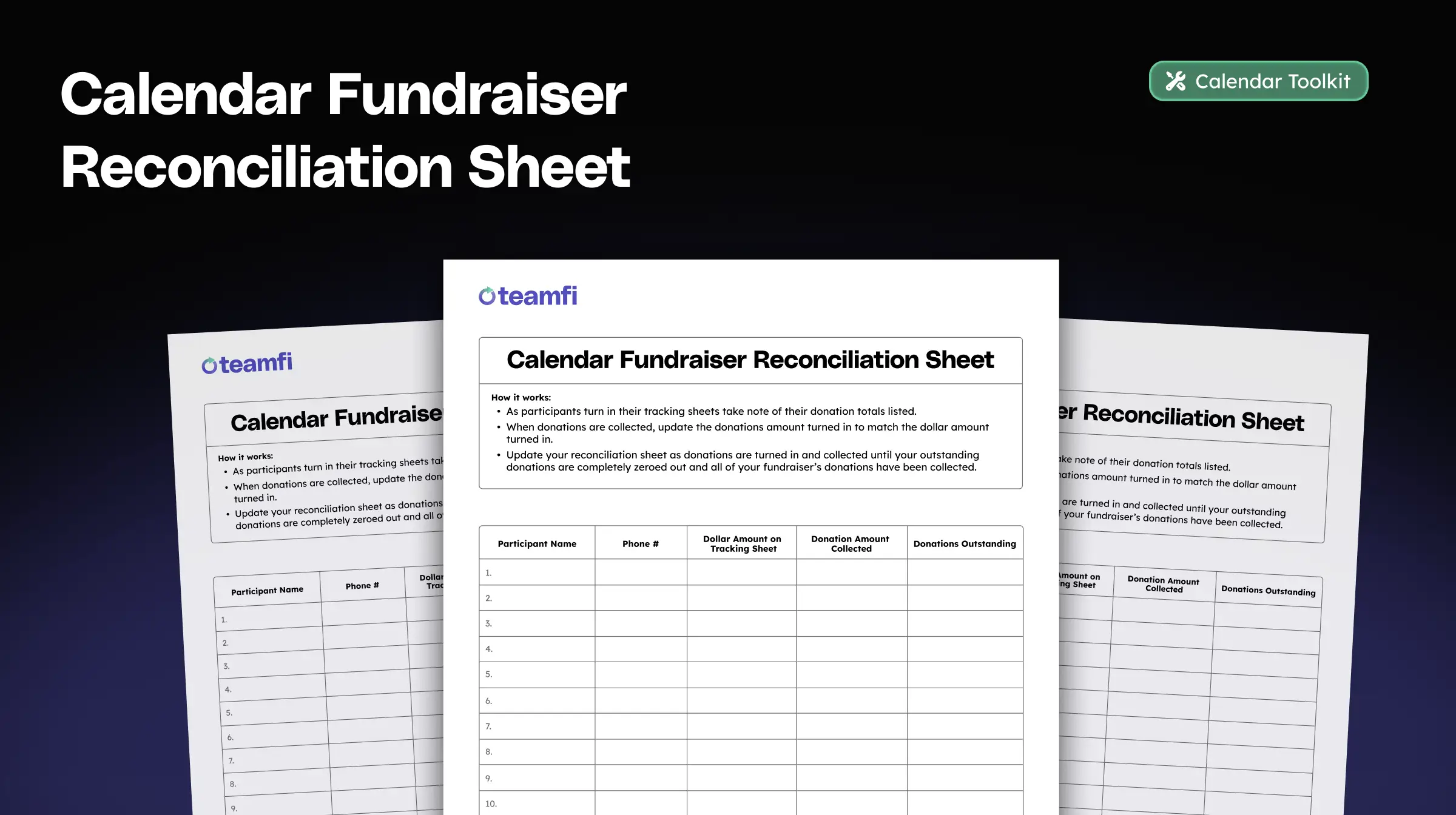
Set one clear return date for calendars, tracking sheets, cash, and checks.
When participants return their materials, review each calendar before accepting it.
Confirm:
- Every recorded donor appears on the tracking sheet.
- Each selected date has a matching donation amount.
- Cash and checks match the reported total.
- Online payments have been identified.
- Pending donations are clearly marked.
- The participant’s name is on every document and envelope.
Count cash with another authorized person when possible. Record the amount received from each participant and provide confirmation that the funds were turned in.
Do not mix uncounted cash from multiple participants before recording individual totals.
Checks and cash should be secured and deposited promptly according to the organization’s financial procedures.
Step 12: Announce the Results and Thank Supporters
After all donations have been counted, share the result with participants and supporters.
A good campaign update should include:
- The total amount raised
- What the funds will support
- A thank-you to donors
- Recognition for participants and volunteers
- Photos or updates showing the fundraiser’s impact
Sample Thank-You Message
Do not disappear after collecting donations. Showing supporters the final result builds trust and may make them more likely to contribute to future fundraisers.
Successful Pick a Date Calendar Fundraisers Run on Teamfi
Thinking of going digital, but not sure what platform is best? Compare the top 7 calendar platforms of 2026 and see how Teamfi stacks up against the other tools teams and schools use to run digital calendar fundraisers.
Paper Pick a Date Calendar Toolkit Download
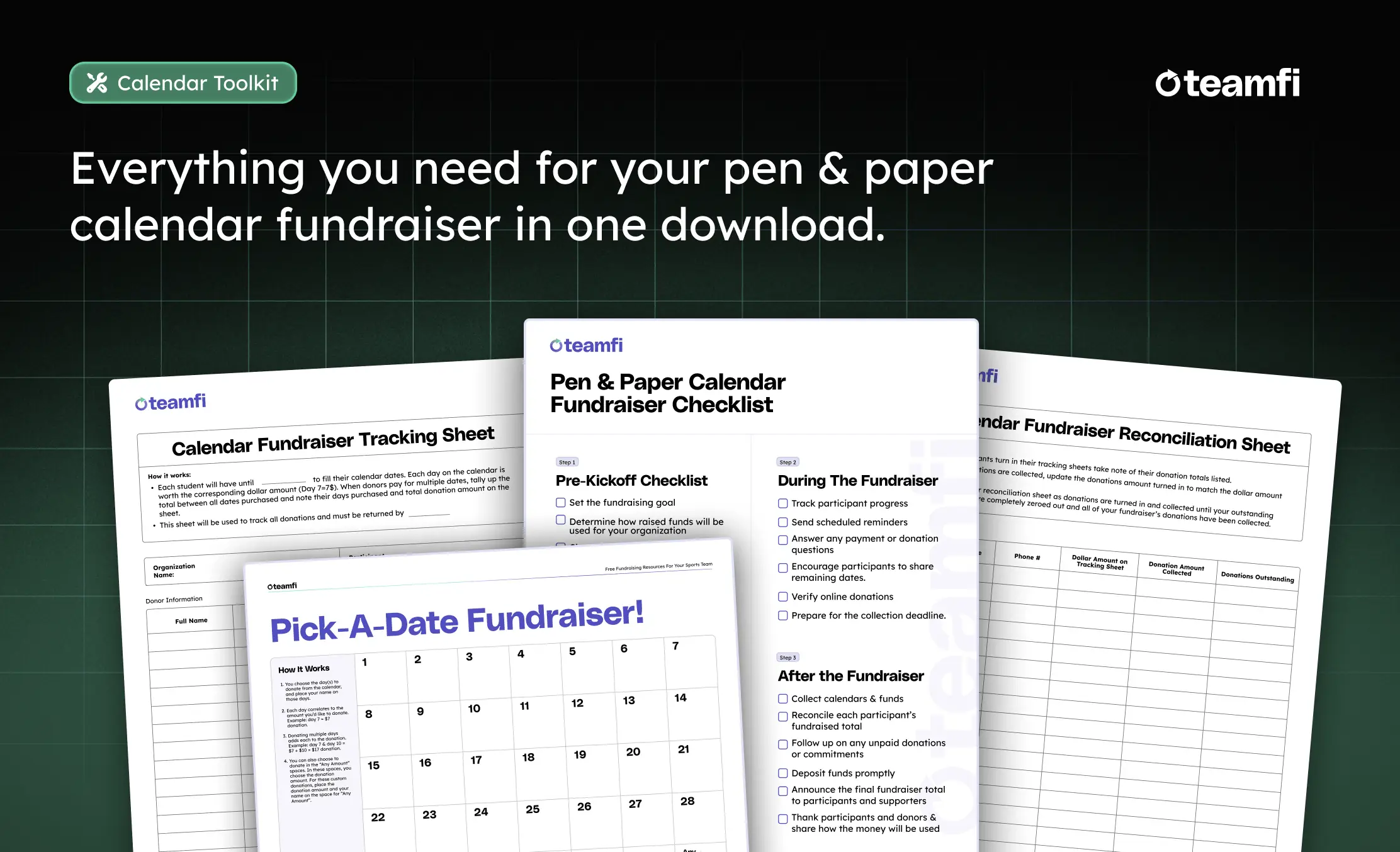
Enter your email below and we'll send you download links for the full ready-to-print calendar toolkit that contains:
- Pick a Date Calendar Template: for you to hand out to each participant so that they can collect donations
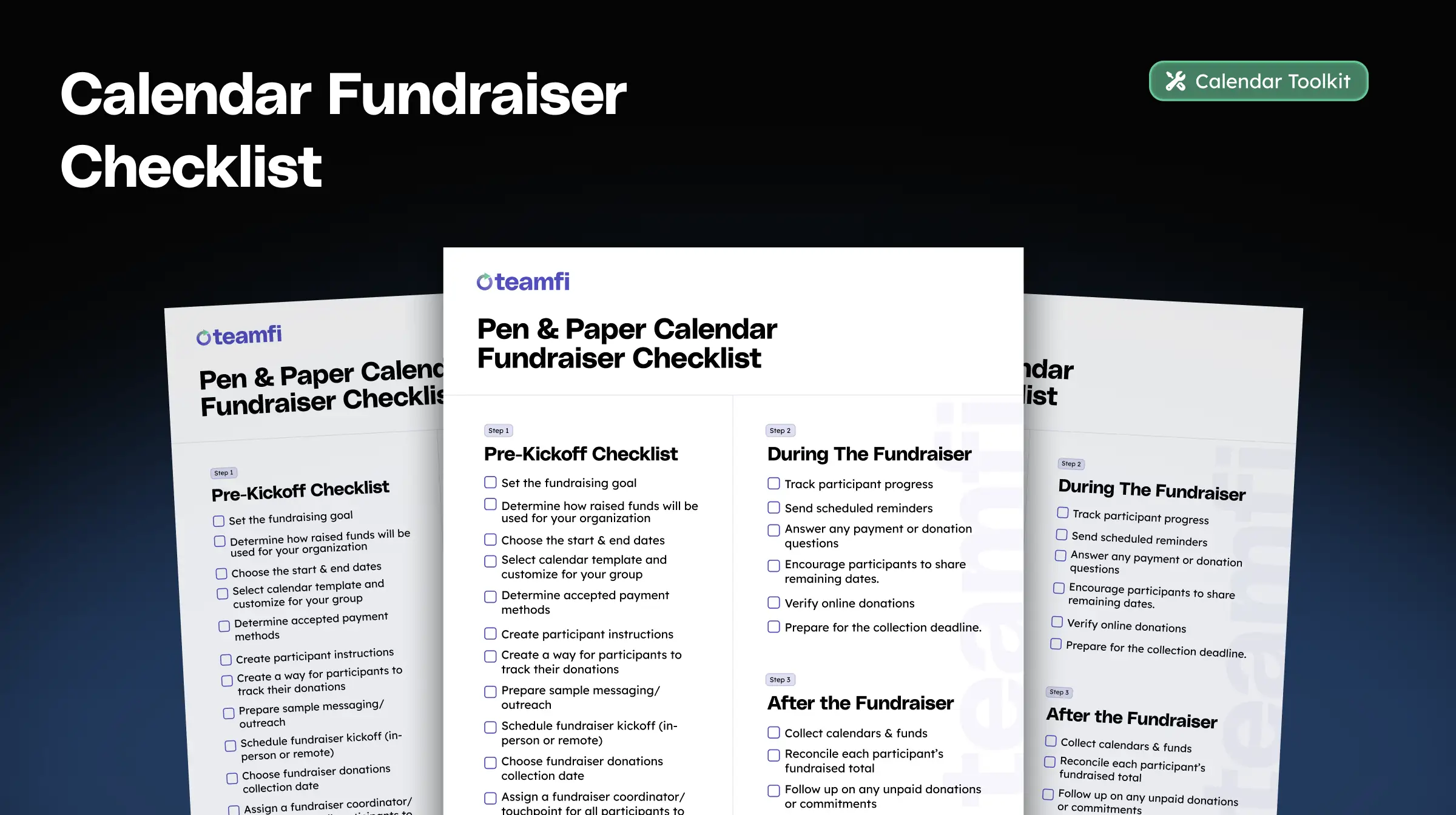
- Calendar Checklist: tracks every step of a successful calendar fundraiser from pre-launch to wrap-up.
- Donation Tracker: helps your participants keep track of each donation throughout your fundraiser.
- Reconciliation Sheet: Helps you close out your calendar fundraiser and make sure all funds are accounted for.
Enter your email and we'll send you the ready-to-print template:
By submitting the form above, you agree our Privacy Policy & Terms of use. Have any questions? Always feel free to contact us.
Enter your email and we'll send you the ready-to-print template:
By submitting the form above, you agree our Privacy Policy & Terms of use. Have any questions? Always feel free to contact us.
Enter your email and we'll send you the ready-to-print template:
By submitting the form above, you agree our Privacy Policy & Terms of use. Have any questions? Always feel free to contact us.
Enter your email and we'll send you the ready-to-print template:
By submitting the form above, you agree our Privacy Policy & Terms of use. Have any questions? Always feel free to contact us.
Enter your email and we'll send you the ready-to-print template:
By submitting the form above, you agree our Privacy Policy & Terms of use. Have any questions? Always feel free to contact us.
Enter your email and we'll send you the ready-to-print template:
By submitting the form above, you agree our Privacy Policy & Terms of use. Have any questions? Always feel free to contact us.
Enter your email and we'll send you the ready-to-print template:
By submitting the form above, you agree our Privacy Policy & Terms of use. Have any questions? Always feel free to contact us.
Enter your email and we'll send you the ready-to-print template:
By submitting the form above, you agree our Privacy Policy & Terms of use. Have any questions? Always feel free to contact us.
Enter your email and we'll send you the ready-to-print template:
By submitting the form above, you agree our Privacy Policy & Terms of use. Have any questions? Always feel free to contact us.
Enter your email and we'll send you the ready-to-print template:
By submitting the form above, you agree our Privacy Policy & Terms of use. Have any questions? Always feel free to contact us.
Enter your email and we'll send you the ready-to-print template:
By submitting the form above, you agree our Privacy Policy & Terms of use. Have any questions? Always feel free to contact us.
Enter your email and we'll send you the ready-to-print template:
By submitting the form above, you agree our Privacy Policy & Terms of use. Have any questions? Always feel free to contact us.
Enter your email and we'll send you the ready-to-print template:
By submitting the form above, you agree our Privacy Policy & Terms of use. Have any questions? Always feel free to contact us.
Enter your email and we'll send you the ready-to-print template:
By submitting the form above, you agree our Privacy Policy & Terms of use. Have any questions? Always feel free to contact us.
Enter your email and we'll send you the ready-to-print template:
By submitting the form above, you agree our Privacy Policy & Terms of use. Have any questions? Always feel free to contact us.
Enter your email and we'll send you the ready-to-print template:
By submitting the form above, you agree our Privacy Policy & Terms of use. Have any questions? Always feel free to contact us.
Enter your email and we'll send you the ready-to-print template:
By submitting the form above, you agree our Privacy Policy & Terms of use. Have any questions? Always feel free to contact us.
Enter your email and we'll send you the ready-to-print template:
By submitting the form above, you agree our Privacy Policy & Terms of use. Have any questions? Always feel free to contact us.
Enter your email and we'll send you the ready-to-print template:
By submitting the form above, you agree our Privacy Policy & Terms of use. Have any questions? Always feel free to contact us.
Enter your email and we'll send you the ready-to-print template:
By submitting the form above, you agree our Privacy Policy & Terms of use. Have any questions? Always feel free to contact us.
Enter your email and we'll send you the ready-to-print template:
By submitting the form above, you agree our Privacy Policy & Terms of use. Have any questions? Always feel free to contact us.
Enter your email and we'll send you the ready-to-print template:
By submitting the form above, you agree our Privacy Policy & Terms of use. Have any questions? Always feel free to contact us.
Enter your email and we'll send you the ready-to-print template:
By submitting the form above, you agree our Privacy Policy & Terms of use. Have any questions? Always feel free to contact us.
Enter your email and we'll send you the ready-to-print template:
By submitting the form above, you agree our Privacy Policy & Terms of use. Have any questions? Always feel free to contact us.
Enter your email and we'll send you the ready-to-print template:
By submitting the form above, you agree our Privacy Policy & Terms of use. Have any questions? Always feel free to contact us.
Enter your email and we'll send you the ready-to-print template:
By submitting the form above, you agree our Privacy Policy & Terms of use. Have any questions? Always feel free to contact us.
Enter your email and we'll send you the ready-to-print template:
By submitting the form above, you agree our Privacy Policy & Terms of use. Have any questions? Always feel free to contact us.
Enter your email and we'll send you the ready-to-print template:
By submitting the form above, you agree our Privacy Policy & Terms of use. Have any questions? Always feel free to contact us.
Enter your email and we'll send you the ready-to-print template:
By submitting the form above, you agree our Privacy Policy & Terms of use. Have any questions? Always feel free to contact us.
Enter your email and we'll send you the ready-to-print template:
By submitting the form above, you agree our Privacy Policy & Terms of use. Have any questions? Always feel free to contact us.
Enter your email and we'll send you the ready-to-print template:
By submitting the form above, you agree our Privacy Policy & Terms of use. Have any questions? Always feel free to contact us.
Enter your email and we'll send you the ready-to-print template:
By submitting the form above, you agree our Privacy Policy & Terms of use. Have any questions? Always feel free to contact us.
Enter your email and we'll send you the ready-to-print template:
By submitting the form above, you agree our Privacy Policy & Terms of use. Have any questions? Always feel free to contact us.
Enter your email and we'll send you the ready-to-print calendar toolkit:
By submitting the form above, you agree our Privacy Policy & Terms of use. Have any questions? Always feel free to contact us.
Enter your email and we'll send you the ready-to-print template:
By submitting the form above, you agree our Privacy Policy & Terms of use. Have any questions? Always feel free to contact us.
Enter your email and we'll send you the ready-to-print template:
By submitting the form above, you agree our Privacy Policy & Terms of use. Have any questions? Always feel free to contact us.
Enter your email and we'll send you the ready-to-print template:
By submitting the form above, you agree our Privacy Policy & Terms of use. Have any questions? Always feel free to contact us.
Enter your email and we'll send you the ready-to-print template:
By submitting the form above, you agree our Privacy Policy & Terms of use. Have any questions? Always feel free to contact us.
Enter your email and we'll send you the ready-to-print template:
By submitting the form above, you agree our Privacy Policy & Terms of use. Have any questions? Always feel free to contact us.